Understanding Contracts
Contracts define what services a customer is entitled to receive. Each customer can have multiple contracts (e.g., one for managed services, one for Microsoft licensing).Contract Structure
A contract contains:- Contract Name - Descriptive name for the agreement
- Status - Active, Pending, or Inactive
- Date Range - Start and end dates
- Line Items - The individual services included
Line Items
Each line item represents a specific service from your Stack.Line Item Fields
| Field | Description |
|---|---|
| Service from Stack | The section and field from your template this line item covers |
| Quantity | How many units are included (users, devices, licenses, etc.) |
| Unit Price | Price per unit for billing calculations |
| Billing Model | How charges are calculated (per user, per device, flat rate) |
Billing Options
| Option | Description |
|---|---|
| Allow Overage | Permit assignments beyond the contracted quantity (will show warnings) |
| Fixed Billing | Charge a fixed amount regardless of actual usage |
| Fixed Amount | When fixed billing is enabled, the amount to charge |
Coverage Components
For more complex tracking, line items can have coverage components that track:- User counts
- Device counts
- License quantities
- Seat counts
- Circuit quantities
- General units
- Supplier information
- Service variant (e.g., “Business Standard” vs “Business Premium”)
- Instance label (for multi-instance services)
Provisioning Summary
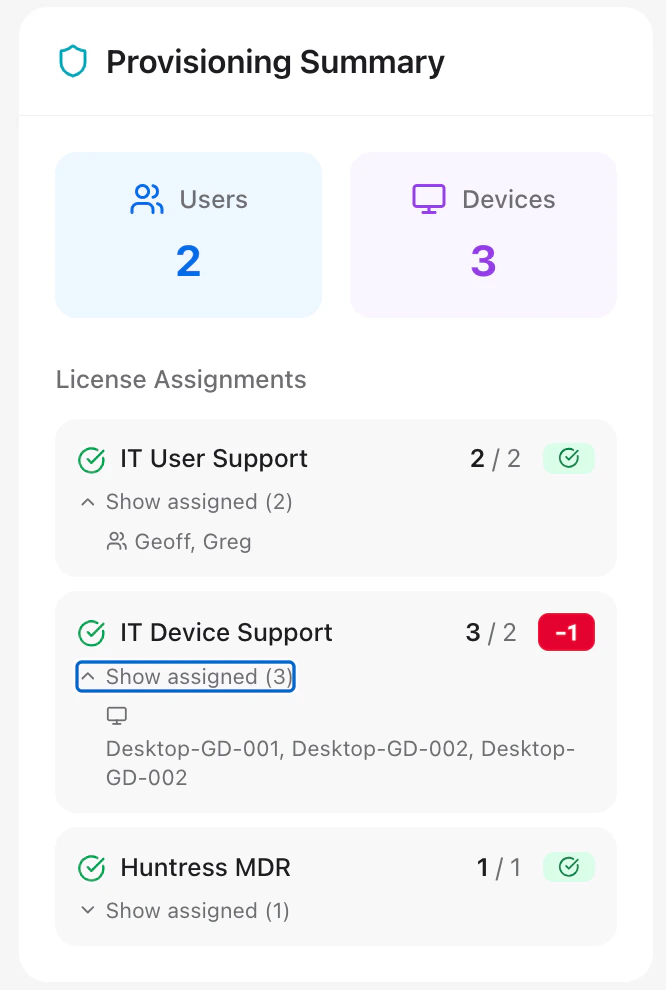
The customer overview page shows a Provisioning Summary widget that displays:- Contracted quantities vs actual usage
- Variance indicators (over/under provisioned)
- Assignment status